Loading...

Quick Featured Images Pro

Quick Featured Images Pro is your plugin for bulk managing featured images in WordPress. It is the perfect tool that allows you to automatically remove, replace, create and bulk manage your WordPress Featured Images.

The advantage is that you no longer have to manage each featured image individually. Simple filters and options save you a lot of time effortlessly.

Version 9.4.5

Changelog

Quick Featured Images Pro Changelog

= 9.5.1 =

  • Fixed a fatal error when license key is invalid
  • Fixed sometimes showing wrong license expire date

= 9.5.0 =

  • Improved performance when display post thumbnails (thanks to @odoremieux)
  • Improved code and switched calling several “constant” from “methods” to “const”.
  • Improved license communication process for activation, deactivation and updates
  • Fixed an error which shows an invalid license key, although it is valid.
  • Fixed deprecated messages
  • Fixed a fatal error when license server returns invalid value
  • Since WordPress 6.6 dropped supported up to 7.1, the required PHP version bumped to 7.2
  • Tested successfully with WP 6.0-6.6

= 9.4.5 =

  • fixed PHP notice
  • fixed broken links
  • Tested successfully with WP 5.8

= 9.4.4 =

  • reduced number of license status check

= 9.4.3 =

  • updated updater api version

= 9.4.2 =

  • const names standardized
  • fixed updater is showing update even if versions are identical

= 9.4.1 =

  • Fix issues when checking for updates
  • Improved licensing compatibility when other Kybernetik Services premium plugins are installed
  • Published on 2021-03-20

= 9.4.0 =

  • Fixed assignments errors in the image column on the post overview page
  • Changed order of action links
  • Updated translations
  • Added class autoload
  • Tested successfully with WP 5.7
  • new branding
  • Published on 2021-03-17

= 9.3.0 =

  • Fixed missed binding to dynamically created selection options in ‘Default Images’
  • Fixed missed higher upgrade of the version number
  • Published on 2020-08-16

= 9.2.3 =

  • Revised translations for WP 5.5
  • Revised an error message in ‘Bulk Edit’
  • Alt text for external images is no longer required in ‘Bulk Edit’
  • Fixed deprecated jQuery function live() in ‘Default Images’
  • Tested successfully with WP 5.5
  • Published on 2020-08-13

= 9.2.2 =

  • Removed a redudant notice on the License page for the expired license status
  • Published on 2020-07-07

= 9.2.1 =

  • Fixed in ‘Default images’ an undefined variable which causes warnings
  • Tested successfully with WordPress 5.4.2
  • Published on 2020-06-20

= 9.2.0 =

  • Added new column in the media library to list at each image for which posts it is set as featured image
  • Added a description for the category filter in ‘Bulk Edit’
  • Added a description for the rules order in ‘Default Images’
  • Fixed outdated translations due to WordPress 5.4
  • Tested successfully with WordPress 5.4
  • Published on 2020-04-22

= 9.1.0 =

  • Added support of Dokan vendors as users in ‘Default Images’
  • Refactored user query for ‘Default Images’
  • Published on 2019-11-29

= 9.0.2 =

  • Fixed wrong versioning
  • Published on 2019-11-21

= 9.0.1 =

  • Fixed some broken translations in ‘Default Images’
  • Updated translations
  • Tested successfully with WordPress 5.3
  • Published on 2019-11-14

= 9.0.0 =

  • Added support of plugin ‘Featured Image From URL’ in ‘Bulk Edit’, ‘Default Images’ and image column
  • Added support of plugin ‘Featured Image By URL’ in ‘Bulk Edit’, ‘Default Images’ and image column
  • Improved performance for the image column on post overview pages
  • Updated translations
  • Tested successfully with WordPress 5.2.4
  • Published on 2019-11-06

= 8.5.0 =

  • Added support for WooCommerce products in ‘Default Images’
  • Tested successfully with WordPress 5.2.2
  • Published on 2019-08-29

= 8.4.11 =

  • Fixed function for image URL sanitizing
  • Tested successfully with WordPress 5.2
  • Published on 2019-05-16

= 8.4.10 =

  • Added checkered background for transparent thumbnails
  • Tested successfully with WordPress 5.1
  • Published on 2019-03-18

= 8.4.9 =

  • Fixed missing feature to include images from external servers in ‘Default Images’
  • Tested successfully with WordPress 5.0.2
  • Published on 2019-01-04

= 8.4.8 =

  • Fixed missing parameter in a function call in Default Images
  • Published on 2018-10-17

= 8.4.7 =

  • Added missing shortcode name ‘ngg’ for NextGen galleries
  • Fixed missing conversions for NextGen Gallery 3
  • Published on 2018-10-17

= 8.4.6 =

  • Fixed a minor bug in Bulk Edit which caused no results for YouTube videos
  • Improved regex in Bulk Edit for YouTube video IDs
  • Improved storing data of downloaded images in Bulk Edit and Default Images
  • Published on 2018-10-15

= 8.4.5 =

  • Revised search operation for internal images in Bulk Edit
  • Revised search operation for internal images in Default Images
  • Hardened add_image function if download function is not available
  • Published on 2018-10-13

= 8.4.4 =

  • Fixed search operation for internal images with relative paths
  • Published on 2018-10-05

= 8.4.3 =

  • Fixed improper URL building with relative image paths
  • Published on 2018-09-27

= 8.4.2 =

  • Added support for the old notation of NextGen singlepic
  • Tested successfully with WordPress 4.9.8
  • Published on 2018-08-04

= 8.4.1 =

  • Fixed a fatal error in ‘Bulk Edit’
  • Fixed a typo in the german translation
  • Published on 2018-07-26

= 8.4 =

  • Added support of external images on Facebook to download them properly
  • Added Export/Import functions on page ‘Default Images’
  • Some refactoring of sanitations on image URLs
  • Updated translations
  • Published on 2018-07-23

= 8.3.8 =

  • Added recognition of ‘poster’ attribute of ‘video’ shortcodes
  • Tested successfully with WordPress 4.9.7
  • Published on 2018-07-06

= 8.3.7 =

  • Fixed a warning raised by the search filter
  • Made calling the function to set the image in ‘Default Images’ more secure against errors
  • Small refactoring for URL parsing
  • Small refactoring for URL comparision
  • Tested successfully with WordPress 4.9.6
  • Published on 2018-07-04

= 8.3.6 =

  • Updated translations due to WordPress 4.9.5
  • Tested successfully with WordPress 4.9.5
  • Published on 2018-04-11

= 8.3.5 =

  • Fixed return of wrong variable which raised PHP warnings
  • Tested successfully with WordPress 4.9.4
  • Published on 2018-02-27

= 8.3.4 =

  • Revised recognition of relative image paths in ‘Default Images’
  • Fixed wrong variable assignment in ‘Default Images’ which caused PHP warnings
  • Published on 2018-01-23

= 8.3.3 =

  • Fixed missing recognition of protocol relative URLs
  • Revised recognition pattern for IFRAME embeds of YouTube (added YT nocookie domain)
  • Improved performance by detecting the site URL only once
  • Tested successfully with WordPress 4.9.2
  • Published on 2018-01-18

= 8.3.2 =

  • Added support for IFRAME embeds of YouTube, Vimeo and Instagram
  • Added greek translation. Thank you, Kostas Arvanitidis!
  • Fixed: broken YouTube maximum size thumbnail if not available, takes YouTube default size thumbnail instead
  • Updated translations due to WordPress 4.9
  • Tested successfully with WordPress 4.9.1
  • Published on 2017-12-02

= 8.3.1 =

  • Improved: Contents embedded via URLs are also recognized if their URLs are put in “embed” shortcuts
  • Changed label ‘Set, replace, remove’ to WP string ‘Bulk Edit’ to be translated in much more languages
  • Changed label ‘Preset Featured Images’ to WP string ‘Default Images’ to be translated in much more languages
  • Changed previous mentioned labels in readme file
  • Tested successfully with WordPress 4.8.3
  • Published on 2017-11-02

= 8.3 =

  • Added japanese translation. Thank you, Kazuyuki Kumai!
  • Added ‘Requires PHP’ info in readme.txt
  • Fixed in ‘Set, replace, remove’: empty string as array key name if preset name contains multibyte signs
  • Fixed in ‘Set, replace, remove’: locale name as variable in error message section
  • Fixed in ‘Set, replace, remove’: typo in page description
  • Removed redudand explanations
  • Tested successfully with WordPress 4.8.2
  • Published on 2017-10-15

= 8.2.1 =

  • Improved in ‘Preset Default Images’: Grid layout in case of multiple images for better overview
  • Improved in all modules: Image paths starting with ‘/’ will be considered
  • Tested successfully with WordPress 4.8.1
  • Published on 2017-08-14

= 8.2 =

  • Added in ‘Preset Default Images’: Post type filters for first image option
  • Revised translations
  • Published on 2017-07-30

= 8.1 =

  • Added french translation. Thank you, Ivan M. Frakov!
  • Revised sanitations for texts and URLs on the pages
  • Revised translations
  • Set activation message as dismissible
  • Published on 2017-07-17

= 8.0 =

  • Added in ‘Set, replace, remove’: Presets
  • Updated translations
  • Published on 2017-07-12

= 7.0 =

  • Added in ‘Set, replace, remove’: action for removing database entries of featured images without existing image files
  • Added in image column: check for existence of image file and, if not available, Delete link
  • Revised: added sanitations to (nearly) all displayed texts
  • Updated translations
  • Published on 2017-07-07

= 6.3 =

  • Added options for external thumbnails of external services embedded with an URL
  • Added background color for transparent thumbnails or vector graphics on admin pages
  • Revised translations
  • Changed in ‘Set, replace, remove’: Tiny rearrangement of explanations
  • Published on 2017-06-21

= 6.2.3 =

  • Fixed missing sanitations of ID in “Columns” class to close possible cross-site-scripting security hole
  • Published on 2017-06-12

= 6.2.2 =

  • Fixed outdated (pre WP 4.8) texts for WP 4.8
  • Added link on the license page to customer account at the online shop
  • Tested successfully with WordPress 4.8
  • Published on 2017-06-09

= 6.2.1 =

  • Fixed minor errors for SVG support
  • Tested successfully with WordPress 4.7.5
  • Published on 2017-05-20

= 6.2 =

  • Added day options to Time Filter
  • Fixed layout in Time Filter
  • Revised translations
  • Published on 2017-03-31

= 6.1.2 =

  • Added loading of Javascript media API on Preset Default Images page
  • Published on 2017-03-20

= 6.1.1 =

  • Fixed missing loading of Javascript media API on post edit pages
  • Fixed a typo, revised translations
  • Published on 2017-03-19

= 6.1 =

  • Changed in ‘Set, replace, remove’: Media library dialog box instead of image list to select the replacement image
  • Added in “Preset Featured Images”: Recognize first image of WordPress standard gallery
  • Published on 2017-03-12

= 6.0.2 =

  • Fixed in ‘Set, replace, remove’: Missing change of featured images
  • Tested successfully with WordPress 4.7.3
  • Published on 2017-03-09

= 6.0.1 =

  • Removed in ‘Preset Default Images’: Check for existence of plugin ‘Video Thumbnail’
  • Published on 2017-03-09

= 6.0 =

  • Improved in all modules: Faster check for found attachment against being an image
  • Improved in ‘Set, replace, remove’: Show feedback about removed images only when the removal option was checked
  • Improved in ‘Activate License’: More stable and verbose license check
  • Improved in ‘Activate License’: Updated EDD Plugin Updater class
  • Changed in ‘Activate License’: link to shop to secure protocol
  • Tested successfully with WordPress 4.7.2
  • Published on 2017-02-23

= 5.4.2 =

  • Added in ‘Preset Default Images’: Do not set the featured image if plugin ‘Video Thumbnail’ is active
  • Fixed in ‘Preset Default Images’: Remove first content image only if setting the featured image is successful
  • Published on 2017-01-04

= 5.4.1 =

  • Fixed deprecated jquery live()
  • Published on 2016-11-08

= 5.4 =

  • Added in ‘Set, replace, remove’: server configuration to avoid PHP timeout and memory limitation in most cases
  • Adjusted texts for WP 4.7
  • Tested successfully with WordPress 4.7
  • Published on 2016-11-07

= 5.3 =

  • Added in ‘Set, replace, remove’: Options to attach and detach image to post
  • Updated translations
  • Published on 2016-10-31

= 5.2 =

  • Added in ‘Set, replace, remove’: Support for hierarchical custom post type in the parent page filter
  • Updated translations, especially German and Spanish
  • Published on 2016-10-17

= 5.1.3 =

  • Improved in ‘Preset Default Images’: Avoiding featured image of last post repeated in new post
  • Published on 2016-10-13

= 5.1.2 =

  • Fixed ‘Set, replace, remove’: unwanted removing of the more-tag in post contents
  • Fixed typo in german translation
  • Published on 2016-10-07

= 5.1.1 =

  • Fixed undefined variable in ‘Preset Default Images’
  • Published on 2016-08-24

= 5.1 =

  • Fixed fatal error at plugin activation
  • Fixed missing default settings
  • Tested successfully with WordPress 4.6.1
  • Published on 2016-08-17

= 5.0 =

  • Changed menu item name ‘Image Columns’ to ‘Settings’
  • Added in Settings: option to set a minimum user role to be allowed to see the plugin
  • Added in ‘Preset Default Images’: option for displaying random featured images at each page load
  • Added in image column: action links to add, change and remove featured images at each post
  • Improved in ‘Preset Default Images’: Random image selection
  • Revised uninstall function for WordPress 4.6 due to the introduction of WP_Site_Query class
  • Revised style of thumbnails in image column, ‘Preset Default Images’ and bulk edit pages
  • Updated *.pot file and german translation
  • Tested successfully with WordPress 4.6
  • Published on 2016-08-16

= 4.0 =

  • Added in ‘Preset Default Images’: import function for rules from the free plugin Quick Featured Images if available
  • Added in ‘Preset Default Images’: option for removing the first content image automatically after the featured image was set successfully
  • Improved: media dialogs show only images instead of all files
  • Improved in ‘Preset Default Images’: only authors instead of all users are listed
  • Fixed in ‘Preset Default Images’: empty user data
  • Fixed in ‘Preset Default Images’: remove forgotten image from an image set if the image is deleted in the library
  • Updated portuguese and german translations
  • Published on 2016-07-21

= 3.9.4 =

  • Added brazilian portuguese translation
  • Tested with WP 4.5.3
  • Published on 2016-07-13

= 3.9.3 =

  • Fixed: outdated translations for post statusses
  • Tested successfully with WordPress 4.5.2
  • Published on 2016-05-09

= 3.9.2 =

  • Fixed: broken recognition of first post image if IMG tag was written in multiple lines
  • Revised plugin activation message function
  • Tested successfully with WordPress 4.5
  • Published on 2016-04-24

= 3.9.1 =

  • Added in ‘Set, replace, remove’: Option to include the parent page in the parent page filter
  • Updated *.pot file and translations
  • Published on 2016-03-14

= 3.9 =

  • Improved: ‘Preset Default Images’ are working in the frontend, too, e.g. at creating a post with 3rd-party applications
  • Improved: Headline hierarchy on options page for better accessibility since WP 4.4
  • Fixed: Not closing HTML table row on license activation page
  • Tested successfully with WordPress 4.4.2
  • Published on 2016-03-10

= 3.8.1 =

  • Fixed in ‘Preset Default Images’: Broken single image rule.
  • Tested successfully with WordPress 4.4.2
  • Published on 2016-02-04

= 3.8 =

  • Added in ‘Preset Default Images’: Selection of multiple images to set one of them randomly as default featured image
  • Improved usability: Advice for selection of multiple images in the media dialog box
  • Improved usability in ‘Set, replace, remove’: On the start page show selected images after closing the media dialog box
  • Fixed in ‘Preset Default Images’: Missing author match case
  • Refactored page ‘Preset Default Images’
  • Tested successfully with WordPress 4.4
  • Updated *.pot file and translations
  • Published on 2015-12-10

= 3.7.1 =

  • Fixed in ‘Preset Default Images’: Double output of ‘no featured image’ in rules order list
  • Fixed in ‘Preset Default Images’: Missing default values of rules order
  • Published on 2015-11-28

= 3.7 =

  • Added in ‘Preset Default Images’: User defined order of applying the types of rules
  • Added in ‘Preset Default Images’: Option ‘First content image’ also takes image of an external server
  • Added in ‘Preset Default Images’: After an image is removed from the library all preset rules assigned with that image will be removed automatically
  • Fixed in ‘Set, replace, remove’: Missing parameter ‘search in title only’ in last step
  • Fixed in ‘Preset Default Images’: Wrong background color for third table row
  • Fixed in ‘Preset Default Images’: Missing translations for changed texts
  • Fixed in ‘Preset Default Images’ and ‘Set, replace, remove’: Remove passwort part of temporary downloaded file name
  • Refactoring in ‘Preset Default Images’
  • Updated *.pot file and translations
  • Published on 2015-11-27

= 3.6 =

  • Added arabic translation. Thank you, Shadi AlZard!
  • Added in ‘Set, replace, remove’: Post Formats Filter
  • Added in ‘Set, replace, remove’: Option to force removal of first content image even the featured image was not changed
  • Added in ‘Set, replace, remove’: Back button on result page. So you can start a further run faster
  • Added in ‘Preset Default Images’: Option to use the first attached image as featured image automatically
  • Fixed table row colors due to changes in WP 4.3
  • Fixed bug in NextGen option
  • Fixed typo in german translation
  • Redesigned in ‘Preset Default Images’: Moved checkboxes to middle column
  • Changed text domain from variable to string
  • Updated *.pot file and translations
  • Published on 2015-10-02

= 3.5 =

  • Added in ‘Set, replace, remove’: Search filter option for searching only in post titles, not in post contents
  • Added search field in default images rules: You can set a default featured image for posts with a specific search term in their title
  • Revised styles for image column in small displays, since WP 4.3
  • Revised styles for page descriptions
  • Revised sentence in footer
  • Updated *.pot file and translations
  • Tested successfully with WordPress 4.3
  • Published on 2015-08-22

= 3.4 =

  • Added spanish translation; thanks to Andrew Kurtis of www.webhostinghub.com
  • Published on 2015-08-02

= 3.3 =

  • Added in image column: Link to the edit page of the displayed image
  • Fixed in license activation: undefined variable
  • Published on 2015-07-16

= 3.2 =

  • Fixed broken activation feature
  • Fixed in ‘Set, replace, remove’: thumbnail IDs of not existing images will be ignored
  • Fixed in ‘Set, replace, remove’: stopping at the more-tag. The plugin ignores the more-tag now and finds content placed after that
  • Added option in ‘Set, replace, remove’: Take the first post image from current site domain
  • Removed IFRAME from footer section
  • Updated german translation
  • Published on 2015-06-28

= 3.1.1 =

  • Removed debug code in activation class
  • Published on 2015-06-06

= 3.1 =

  • Fixed in ‘Set, replace, remove’: Missing class methods for Set, replace, remove
  • Fixed in ‘Set, replace, remove’: Bug which yielded the error message “No matches found” at the Confirmation step
  • Fixed in ‘Set, replace, remove’: Wrong links in the Confirmation list if cache was used
  • Fixed in ‘Set, replace, remove’: Broken bulk assign link at each image in the media library
  • Published on 2015-06-04

= 3.0 =

  • Added option in ‘Set, replace, remove’ for selection of multiple images: Use each selected only once
  • Added option in ‘Set, replace, remove’ for selection of multiple images: Remove excess featured images after all selected images are used
  • Tested successfully with WordPress 4.2.2
  • Updated german translation
  • Published on 2015-05-10

= 2.0 =

  • Introduced licensing via activation key
  • Added option in ‘Set, replace, remove’: Take first image of NextGen galleries
  • Added option in ‘Set, replace, remove’: Take first external image
  • Added option in ‘Set, replace, remove’: Remove first image in content
  • Improved performance of confirmation step by using cached results of preview step
  • Updated german translation
  • Published on 2015-05-04

= 1.1.0 =

  • Added option in ‘Set, replace, remove’: Take first attached image
  • Published on 2015-04-08

= 1.0.0 =

  • Initial Pro version
  • Published on 2015-03-15

== Upgrade Notice ==

= 9.3.0 =
Fixed missed binding to dynamically created selection options in ‘Default Images’

= 9.2.3 =
Revisions and fixes for WordPress 5.5, tested successfully with WP 5.5

= 9.2.2 =
Removed a redudant notice on the License page for the expired license status

= 9.2.1 =
Fixed in ‘Default images’ an undefined variable, tested with WordPress 5.4.2

= 9.2.0 =
Added column in the library and some descrptive texts, tested with WordPress 5.4

= 9.1.0 =
Added support of Dokan vendors as users in ‘Default Images’

= 9.0.2 =
Fixed wrong versioning

= 9.0.1 =
Updated translations, tested successfully with WordPress 5.3

= 9.0.0 =
Added support external featured images, improved image column, tested with WordPress 5.2.4

= 8.5.0 =
Added support for WooCommerce products, tested successfully with WordPress 5.2.2

= 8.4.11 =
Fixed function for image URL sanitizing, tested with WordPress 5.2

= 8.4.10 =
Added checkered background for transparent thumbnails, tested with WordPress 5.1

= 8.4.9 =
Fixed missing parameter in a function call in Default Images, tested with WordPress 5.0.2

= 8.4.8 =
Fixed missing parameter in a function call in Default Images

= 8.4.7 =
Fixed missing shortcode name and conversions for NextGen Gallery 3

= 8.4.6 =
Minor fix and improvements for YouTube videos and downloaded images

= 8.4.5 =
Revised search operation for internal images in Bulk Edit and Default Images

= 8.4.4 =
Fixed search operation for internal images with relative paths in Bulk Edit

= 8.4.3 =
Fixed URL building with relative image paths

= 8.4.2 =
Added support for the old notation of NextGen singlepic, tested with WordPress 4.9.8

= 8.4.1 =
Fixed a fatal error in ‘Bulk Edit’, fixed a typo in the german translation

= 8.4 =
Added support of Facebook images, added Export/Import functions on page ‘Default Images’

= 8.3.8 =
Added recognition of ‘poster’ attribute of ‘video’ shortcodes, tested with WordPress 4.9.7

= 8.3.7 =
Small improvemnts for more robustness, tested successfully with WordPress 4.9.6

= 8.3.6 =
Updated translations due to WordPress 4.9.5, tested with WordPress 4.9.5

= 8.3.5 =
Fixed return of wrong variable which raised PHP warnings, tested with WordPress 4.9.4

= 8.3.4 =
Revision and fix in ‘Default Images’

= 8.3.3 =
Revised recognition patterns and improved performance, tested with WordPress 4.9.2

= 8.3.2 =

  • Added support for IFRAME embeds of YouTube, Vimeo and Instagram, greek translation, tested with WordPress 4.9.1

= 8.3.1 =
Considering embed shortcuts, changed labels

v= 8.3 =
Added japanese translation and Requires PHP info in readme.txt

= 8.2.1 =
Grid layout in ‘Preset Default Images’, recognition of ‘/’ at paths starts, tested with WP 4.8.1

= 8.2 =
Added post type filters for first image option in ‘Preset Default Images’

= 8.1 =
Added french translation, revised sanitations and translations, tested with WordPress 4.8

= 8.0 =
Added presets in ‘Set, replace, remove’

= 7.0 =
Added actions for removing database entries of featured images without existing image files

= 6.3 =
Added support for external thumbnails of external services embedded with an URL

= 6.2.3 =
Fixed missing sanitations of ID in “Columns” class to close possible cross-site-scripting security hole

= 6.2.2 =
Fixed outdated (pre WP 4.8) texts for WP 4.8, tested with WP 4.8

= 6.2.1 =
Fixed minor errors for SVG support, tested with WP 4.7.5

= 6.2 =
Added day options to Time Filter

= 6.1.2 =
Added wp_enqueue_media() in ‘Preset Default Images’

= 6.1.1 =
Fixed missing wp_enqueue_media(), fixed typo

= 6.1 =
Selecting replacement images via Media library dialog box, first image of galleries as default image

= 6.0.2 =
Fixed in ‘Set, replace, remove’: Missing change of featured images

= 6.0.1 =
Removed in ‘Preset Default Images’: Check for existence of plugin ‘Video Thumbnail’

= 6.0 =
Improvements in license activation, bulk edit and image check

= 5.4.2 =
Fixes in ‘Preset Default Images’

= 5.4.1 =
Fixed deprecated jquery live()

= 5.4 =
Added in ‘Set, replace, remove’: server configuration to avoid PHP timeout and memory limitation

= 5.3 =
Added in ‘Set, replace, remove’: Options to attach and detach image to post

= 5.2 =
Added in ‘Set, replace, remove’: Support for hierarchical custom post type in the parent page filter

= 5.1.3 =
Improved in ‘Preset Default Images’: Avoiding featured image of last post repeated in new post

= 5.1.2 =
Fixed unwanted removing of the more-tag in post contents

= 5.1.1 =
Fixed undefined variable in ‘Preset Default Images’

= 5.1 =
Fixed fatal error at plugin activation, fixed missing default settings

= 5.0 =
New features: user role option, random images per page load, action links in image columns, tested with WP 4.6

= 4.0 =
Added in ‘Preset Default Images’: import function and option for removing the first content image automatically, some improvemnts and fixes

= 3.9.4 =
Added brazilian portuguese translation, tested with WP 4.5.3

= 3.9.3 =
Fixed: outdated translations for post statusses, tested with WP 4.5.2

= 3.9.2 =
Fixed broken recognition of first post image, revised plugin activation message function, tested with WP 4.5

= 3.9.1 =
Added in ‘Set, replace, remove’: Option to include the parent page in the parent page filter

= 3.9 =
‘Preset Default Images’ are working in the frontend, too; improved headline hierarchy on options page

= 3.8.1 =
Fixed broken single image rule

= 3.8 =
Added in ‘Preset Default Images’: Selection of multiple images to assign one of them randomly per post

= 3.7.1 =
In ‘Preset Default Images’: Fixed two warnings

= 3.7 =
In ‘Preset Default Images’: Considers first image from an external server and automated removal of rules after an image is removed in the library, some fixes

= 3.6 =
Added Post Formats Filter, added forced removal of first content images, added first attached image as default featured image, fixed table row colors, fixed bug in NextGen option, fixed typo in german translation

= 3.5 =
Added search field in default images rules, revised styles for image column since WP 4.3, tested in WP 4.3

= 3.4 =
Added spanish translation; thanks to Andrew Kurtis of www.webhostinghub.com

= 3.3 =
Added image edit link, fixed undefined variable

= 3.2 =
Fixed broken activation feature, added option ‘first post image from current site domain’

= 3.1.1 =
Removed debug code in activation class

= 3.1 =
Fixed bugs

= 3.0 =
New options for multiple image selection

= 2.0 =
Introduced licensing via activation key, added functions for first images, improved performance of confirmation step

= 1.1.0 =
New options: Consider first attached image

= 1.0.0 =
Initial release

Documentation

Quick Featured Images Pro

Quick Featured Images Pro
Price range: $ 75.00 through $ 398.00

Set, change and delete a bunch of featured images from WordPress sites and posts in minutes instead of hours.

What the Plugin Does

Quick Featured Images Pro allows you to set, create, replace or delete your featured images in bulk. It is therefore a real time saver, as you no longer have to change your images individually one by one. The Pro version provides you with numerous options and filters that make the handling of your featured images even easier.

How You Can Benefit from it:

List BulletThe Quick Featured Images Pro plugin that allows you to automatically set, replace, and remove thousands of images in bulk.
List BulletProven ease of use so you can start seeing the results today.
List BulletAutomatically place pictures for new posts at random from your picture library, by categories and other filters. This even works for imported posts!
List BulletPacked with powerful features that will take your productivity to a new level (update existing posts, set default values for current and new posts).
List BulletFirst-class filters so you can choose which posts you want to change (filter by date, month, year, keywords, categories, author, post format, etc.)!
List BulletSave all settings to use again and again.

Choose an Option!

We offer four license options tailored to fit your exact needs. Whether you’re managing a single site or up to 25 domains, we’ve got you covered. Choose from our single site, a three, five or 25 domain licenses – all of which are lifetime licenses. With just a one-time payment, you’ll unlock unlimited access to all features.

Blog

Lifetime for a Single Site

$75

Privat

Lifetime for 3 Domains

$180

Professional

Lifetime for 5 Domains

$238

Agency

Lifetime for 25 Domains

$398

Overview

Incredible Optionas and Filters

Choose from a huge number of options and filters to tighten your selection. For example, you can replace WooCommerce product images in bulk an get rid of the WooCommerce default image. Or, you can use features like random selection or external images. You can also use awesome filters in bulk editing for tag, post, status, time, image size and much more.

Features

Quick Featured Images Pro, the premium plugin for WordPress, comes with powerful and time-saving functions for managing featured images. Set featured images of over hundreds posts in one go, automate featured images and image columns. This plugin gives you a lot of freedom regarding the administration of featured images on WordPress sites.

Options


Based on your selected action you can toggle on and off some options:

  1. overwrite existing featured images with new ones or keep them unchanged. The latter setting is the default.
  2. ignore posts with existing featured images
  3. remove the first embedded image from the post content after this image was set as featured image
  4. force removal of first content image even the featured image was not changed
  5. attach image to post after set as featured image
  6. remove featured image
  7. remove all featured images without existing file
  8. detach image and post after featured image is removed

If you want to take the first post image as featured image you can choose between:

  1. the first post image if available in the media library
  2. the first post image from the current site domain, copy and add it to the media library if not available there
  3. the first external post image; it will be downloaded and added to the media library automatically:
    • the first attached image of a post
    • the first image of a WordPress standard gallery
    • the first image of a NextGEN Gallery if the NextGen plugin is activated

If you selected multiple images to set them as featured images in random order you can add these options:

  1. Use each selected only once. If there are more posts than selected images the remaining posts will not be changed.
  2. Remove excess featured images after all selected images are used.

Filters


If there would be no filters Quick Featured Images Pro would affect all posts and pages without exception! In most cases this is not desired.

The implemented filters allow you to narrow down the action to only the posts and pages you want to modify. The built-in filters are:

  1. Filter by post type: Search by post types. By default all posts, pages and custom post types will be affected
  2. Filter by post format: Search by post formats. By default the standard post format will be affected
  3. Filter by multimedia type: Search for audio and video files
  4. Filter by status: Search by several statuses (published, draft, private etc.). By default all statuses will be affected
  5. Filter by search: Search by search term, with option to search in post titles only
  6. Filter by time: Search by time specifications
  7. Filter by author: Search by author
  8. Filter by custom taxonomy: Search by terms of registered taxonomies of a plugin or a theme
  9. Filter by featured image size: Search for small featured images below a given size
  10. Filter by category: Search posts by category, including categories of custom post types
  11. Filter by tag: Search posts by tag, including tags of custom post types
  12. Filter by parent page: Search child pages by parent page, including pages of any hierarchical custom post type

Save Presets


If you have to manage featured images recurrently presets are the time-saver for you. You can store all settings of many processes to recall them easily the next time.

Set rules easily


You can set rules for default featured images of posts easily. Every time you insert a new post or save an existing post Quick Featured Images Pro will look for a rule to add and to change the default featured image to the saved post.

You can use both images from the media library and images from external servers, e.g. from a CDN, as defaults.

You can define the rules based on:

  1. first content image if available in the media library or on an external server
  2. search string in post title
  3. custom taxonomy supporting featured images
  4. post tag (including tags of custom post types)
  5. post category (including categories of custom post types)
  6. post author
  7. post format
  8. post types: ‘Post’, ‘Page’ and custom post types supporting featured images
  9. for Woocommerce products: the product type, category, tag, shipping class, delivery time, unit, price label and your custom product attributes

The rules are easy to set: choose an image, a taxonomy, a value and save the settings. That’s it. You do not need to code.

You can add, change and delete every rule whenever you want. So you get an unlimited and precise set of rules for automatic default featured images in your website.

You can define in which order the types of rules should be applied. Look for the matching tag, then for the search term? Other the other way around? You have the ability to set the order.

You can set multiple images per rule. The plugin picks up an image randomly to set that as featured image for the new post.

Every time you remove an image from the media library all rules assigned with the removed image are removed automatically. So you get no “forgotten rules”.

You can switch between:

  1. overwriting existing featured images or
  2. keeping them unchanged
  3. using the first attached image as featured image automatically.

The latter setting is the default. The option is used every time a post is saved.

Last but not least: you can export and import all the rules to migrate them easily from site to site.

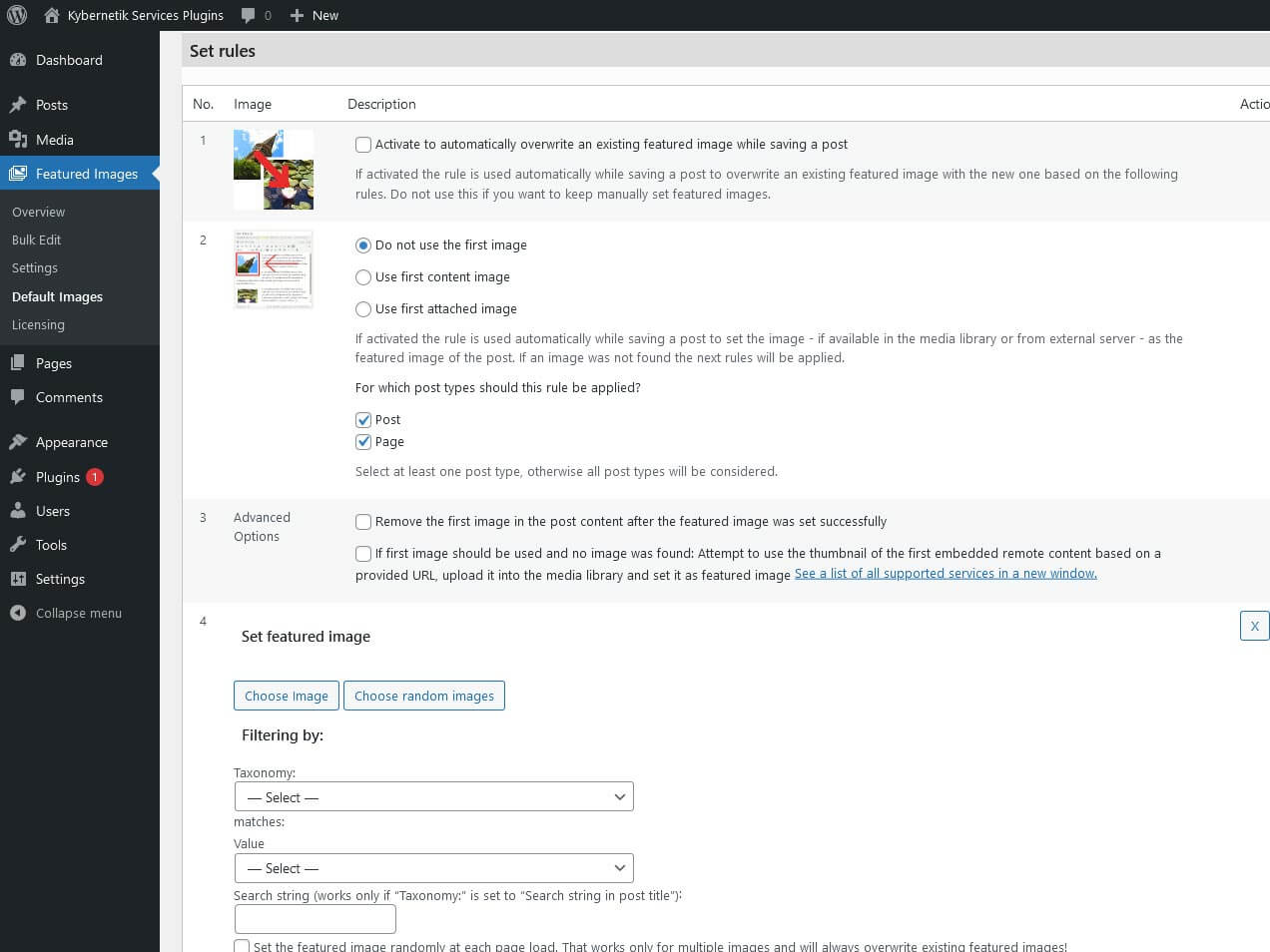
How it looks

Take a look at the rules setting page:

Image column


Quick Featured Images Pro adds a new column in posts lists. The additional column shows the currently assigned featured image of each post and action links for quick adding, changing, removing and editing the featured image at each post. That way changes to images can be done faster.

The new column has the heading ‘Contribution picture’ and can be sorted by picture ID. You will find the pictures on the post overviews for all post types that support featured images.

Users who are authorized to edit images in the media library also see a link under each image that leads directly to the page for further editing of the image. All image information, including excerpts from featured images, can thus be changed more quickly.

In addition, you can add, replace or remove the image for each post in the image column. You do not have to leave the list and you stay on the page.

This column gives you a quick overview of all the used images. You can also see posts without a featured image at a glance.

Quick Featured Images Pro für WordPress

Under Featured images > Settings you can switch the additional picture columns for each content type on and off, even for custom post types if they support featured pictures.

Automatic upgrades


Get automatic upgrades

With the Pro version you get die latest upgrades for free for 365 days from the day of the purchase.

As usual, you will see new updates in the WordPress plugin overview, which you can carry out with a click of the mouse.

GDPR compliant


Protects personal data

Quick Featured Images is developed in such a way that it neither collects any data and therefore does not process any personal data. We are proud to say that Quick Featured Images Pro is GDPR compliant.

The Right License for You

We offer four different license options to suit your specific needs. There is the blog, private, professional and agency license available.

Blog


$75

Best choice for a single blog

List BulletPay once, use forever
List BulletIncludes 1 year updates on one registerted domain
List BulletNo subscription
List BulletNo automatic renewal
List Bulletup to 35% discount on renewals
List BulletExclusively support by e-mail from a real person
List BulletSupport covers assistance with the installation and use
List BulletBest choice for a single blog

Private


$180

Best choice for use on different sites

List BulletOnly $60 per domain
List BulletPay once, use forever
List BulletIncludes 1 year updates on three different domains
List BulletNo subscription
List BulletNo automatic renewal
List Bulletup to 35% discount on renewals
List BulletExclusively support by e-mail from a real person
List BulletSupport covers assistance with the installation and use
List BulletBest choice for use on different sites
List BulletSave $45
List BulletSave 20 % per domain

Professional


$238

For your own and additional websites

List BulletOnly $47.60 per domain
List BulletPay once, use forever
List BulletIncludes 1 year updates on five different domains
List BulletNo subscription
List BulletNo automatic renewal
List Bulletup to 35% discount on renewals
List BulletExclusively support by e-mail from a real person
List BulletSupport covers assistance with the installation and use
List BulletBest choice for your own and additional websites
List BulletSave $137
List BulletSave 36 % per domain

Agency


$398

For agencies to use on customer projects

List BulletOnly $15.92 per domain
List BulletPay once, use forever
List BulletIncludes 1 year updates on 25 different domains
List BulletNo subscription
List BulletNo automatic renewal
List Bulletup to 35% discount on renewals
List BulletPrefered support by e-mail from a real person
List BulletSupport covers assistance with the installation and use
List BulletPreferred implementation of feature requests
List BulletBest choice for agencies to use on customer projects
List BulletSave $1,477
List BulletSave 80 % per domain

Pro vs. free

Upgrade for more

The free Quick Featured Images plugin already offers a wide range of functions and filters. However, the Pro version of Quick Featured Images provides a bunch of additional features that enable an even more selective setting.

Actions in Bulk Edit

Featurefreepro
Sets the selected image as new featured image
Sets multiple images randomly as featured images
Replaces featured images by the selected image
Removes the selected image as featured image
Removes any image as featured image
Remove all featured images without existing image files
Removes database entries of featured images without existing image files
Sets the first image as featured image
Sets the external image as a featured image (if one of the two free plugins is activated): Featured Image By URL at wordpress.org or Featured Image From URL at wordpress.org)

Do You Have a Question?

We’re here to help! Whether you need more information about Quick Featured Images or have a specific inquiry, we’re just a message away. So, don’t hesitate to reach out. Our team is ready and excited to provide the insights and support you need.

Shopping Cart
Scroll to Top